Workspace Policies: Five Toggles for Accurate, Self-Evolving Processes
Five workspace toggles decide whether your process library stays authoritative or quietly rots. Here is what each one does and what it costs when you leave it off.
A process document nobody has opened in eight months is not a process. It is a fossil. An AI agent reading it through MCP will still quote it back with the confidence of fresh policy, and your team will still act on the answer.
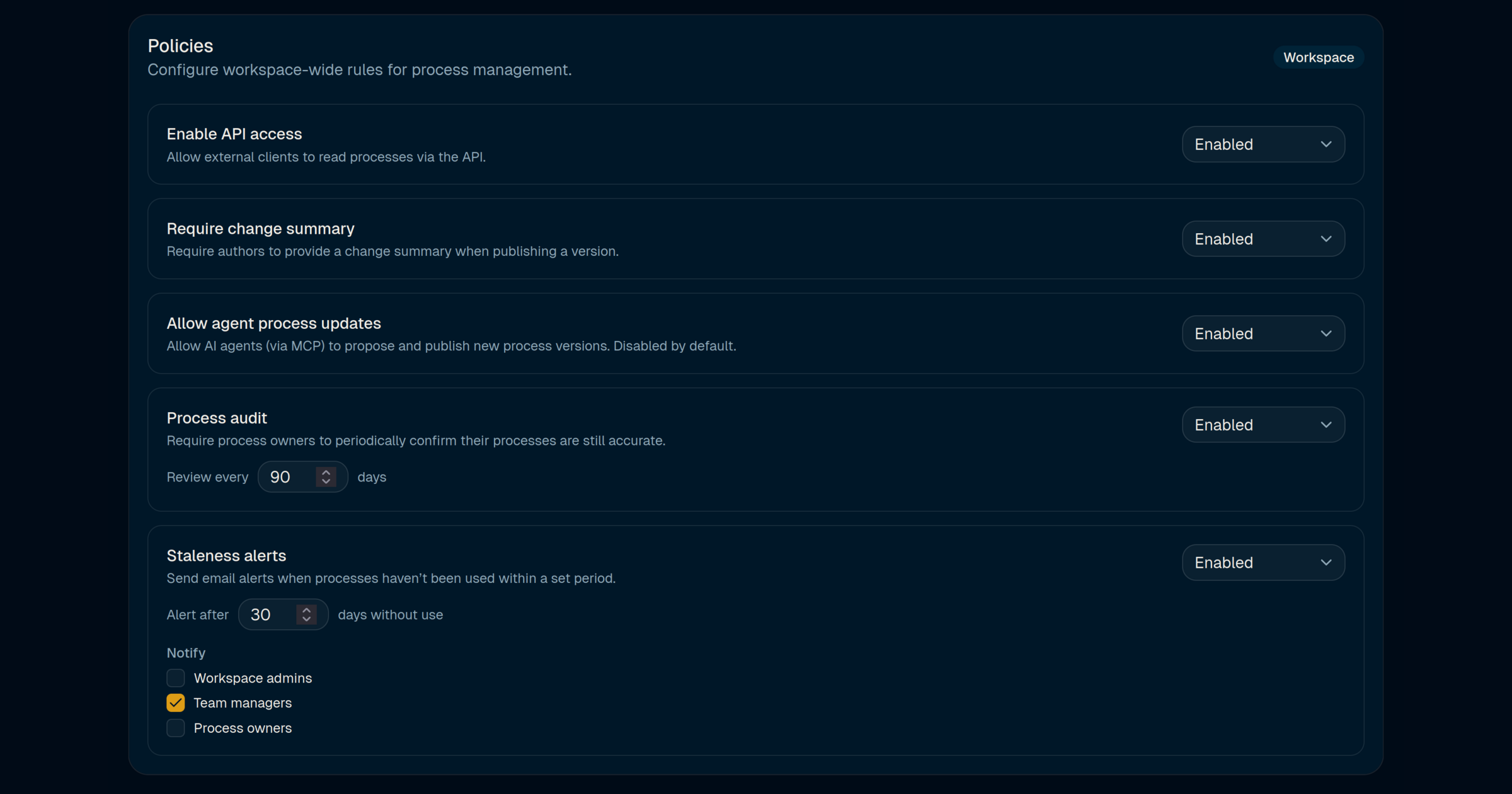
The Workspace settings panel exists so that stops happening. A handful of switches decide whether your skills stay authoritative, get confirmed on a cadence, and (when you allow it) improve themselves from the agents that actually use them. Here is what each toggle does, what it costs when you leave it off, and where to turn it on first.
Scope: pick the level that owns the rule
The Scope selector at the top looks like a view filter. It is actually the most important control on the page. Policies cascade: Workspace sets the floor, Team overrides Workspace, Department overrides both. That hierarchy is why you can hold Legal and RevOps to different review cadences without forking your process library.
A sane default is to keep every toggle on at the Workspace level, then relax one or two settings for groups that have a real reason. Example: the Growth team writes campaign playbooks that change weekly and do not need a change summary on every iteration. Drop that one requirement for their Team scope only, and the rest of the company keeps the audit trail finance actually uses.
The value is control that matches how your org already works. Without scoping, you get one of two bad outcomes. Either the whole company runs at the strictest setting any one function needs, which slows everyone down. Or you run at the loosest, and your auditable processes quietly lose their audit trail.
Require change summary: a reviewer's gift from their past self
When this is on, publishing a new version of a process blocks until the author writes a one-line summary of what changed. "Raised EMEA travel cap to £1,200 after Q1 FX shift" takes 15 seconds to write. It saves the next reviewer, and the next auditor, a multi-hour diff across a 40-paragraph document.
It also makes list_skills output readable at a glance. Every version carries its summary, so a compliance reviewer can scan six months of changes in a single scroll instead of reopening each revision. That is the same reason engineering teams enforce commit messages on main. Process versions deserve the same discipline.
Leave this off and you get Confluence-shaped history: a timeline of edits with no explanation, and a reviewer who has to reverse-engineer intent from the diff.
Allow agent process updates: let processes evolve from real usage
This is the switch that turns your process library from a static wiki into something closer to a living system. With it off, processes only change when a human edits them. With it on, any MCP agent you trust can call propose_skill_update when it notices a gap in the rules it just executed.
A concrete pattern: your support agent runs the refund process 40 times in a week. Twelve of those requests hit a scenario the current policy does not cover (customer paid partly in store credit, partly on card). Instead of improvising a refund rule on the fly, the agent drafts v2.7 with a new clause covering the store-credit case and files it as a proposal. A named owner reviews the proposal the same way they would review a human-authored version. Nothing publishes without that review and an explicit apply_skill_update step.
The benefit is twofold. Agents stop papering over policy gaps with plausible guesses, because they have a way to surface the gap to a human. And the process library grows from the edge cases that actually occur in production, not from what someone thought mattered at the quarterly planning session.
Keep it disabled by default. Turn it on deliberately, starting with the processes where drift between written policy and real operations is largest. Support playbooks, expense edge cases, and onboarding checklists usually earn the most from this first.
Process audit: re-attest on a cadence, stop the "last updated 2023" problem
Every 90 days, by default, the named owner of each process gets a prompt: is this still correct? One click to confirm, or they open an edit. That single loop is the difference between a library you can show an auditor and a wiki full of documents whose last-updated date is two CEOs ago.
The cadence is yours to set. Ninety days fits most operational processes. Security runbooks and data-handling procedures often move to 30. Legal boilerplate that changes with regulation might be 180. Whatever you pick, the point is the same: somebody with authority looked at this policy recently and said it still applies. When the agent quotes it, the quote is backed by a recent confirmation, not a commit from a former employee.
The cost of leaving this off is slow and invisible. Drift compounds. By the time somebody notices that the approved vendor list has three companies on it that no longer exist, the agents have been citing them for months.
Staleness alerts: catch the processes nobody is calling
Audits catch documents nobody edits. Staleness alerts catch documents nobody uses. Both failure modes matter, and they are different problems.
If your expense-approval skill has not been read by any MCP client in 30 days, one of three things is true. Your agents are not wired to call it. The skill does not match the shape of the questions employees ask. Or the process has quietly moved to a different tool and the skill is now a ghost. All three are fixable, but only if someone knows. The alert mails the people who can act:
- Workspace admins when the issue is likely a platform or routing problem (no client is calling anything in a whole category, for example).
- Team managers when adoption inside a function has slipped and the process owner might not see the pattern.
- Process owners when the problem is almost certainly about the content itself: phrasing, inputs, or escalation rules that do not match reality.
Notify at least one of these groups. The default of "Team managers only" is a reasonable starting point because managers usually notice adoption gaps fastest and can route the fix. Turn on Process owners as well once you are confident the alerting is not noisy. Workspace admins are worth adding the day you scale past a handful of processes and nobody has the whole picture.
How the toggles work together
Treat these five settings as one system for keeping the library honest. Scope decides who the rules apply to. Change summaries and audits give you the paper trail auditors and new owners need. Staleness alerts surface the skills that stopped earning their keep. Agent process updates let the system grow from what agents actually learn in the field.
A reasonable starting configuration for a team adopting Koinoflow this quarter:
- Scope: Workspace defaults on, one Team-level override for any group that has a real reason to relax a rule.
- Require change summary: On everywhere. This one is almost free.
- Allow agent process updates: Off at Workspace level. Turn on at Team level for one or two high-drift processes and watch the proposal queue for a few weeks.
- Process audit: On, 90 days for ops, 30 for security and privacy runbooks.
- Staleness alerts: On, 30 days, notify Team managers. Add Process owners after the first cycle.
The configuration itself is versioned in the audit log, so changing a policy six months from now is as reviewable as changing a process.
What to do next
Open Workspace settings and tighten whichever toggle is closest to a live problem you have today. If you already know of a stale process, set the audit cadence and let the next reminder surface it. If your agents keep guessing around one policy, turn on agent process updates for that single process and let the queue tell you where the real gaps are. The value of these switches is cumulative, but you do not have to flip them all at once.